Jonathan Fodi

Projects

mars rover

my first schematic ever. teensy-based soil sampling system. photosensors are used to determine the frequency of light shone through a soil sample. science team used these measurements to detect presence of materials in the sample. on board drilling, pump, and vibration controls.

unobtrusive heart monitor for autonomous buses

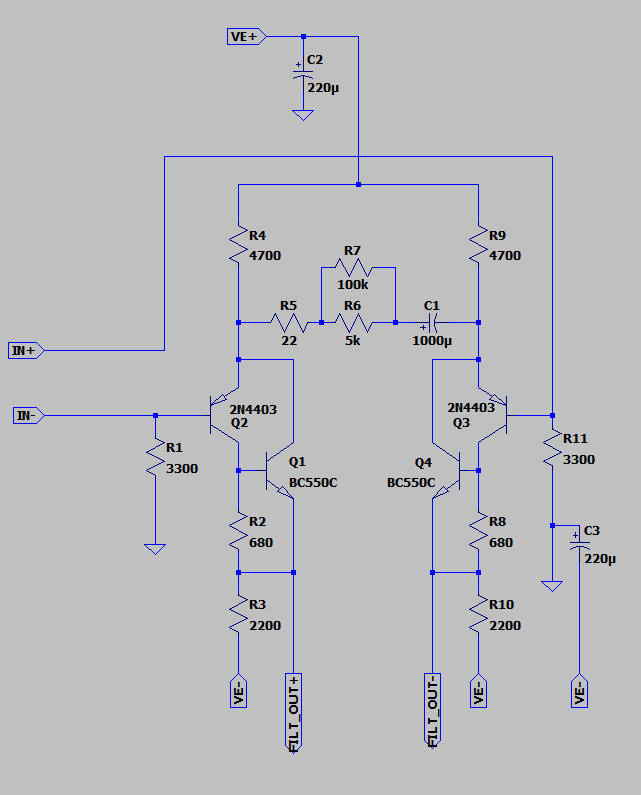
high precision analog microphone for picking up heart sounds through vehicle upholestry. amp is tuned to pick up frequencies at the known heart rate range. differential amp blocks out any vehicle noise.

Microphone preamp circuit Amplifier and low pass filter circuit

f1 style ev

ground up electrical design of an EV for FSAE michigan. this got scrappy. lot of late nights getting things to blink and evading solder fumes.

power control ic

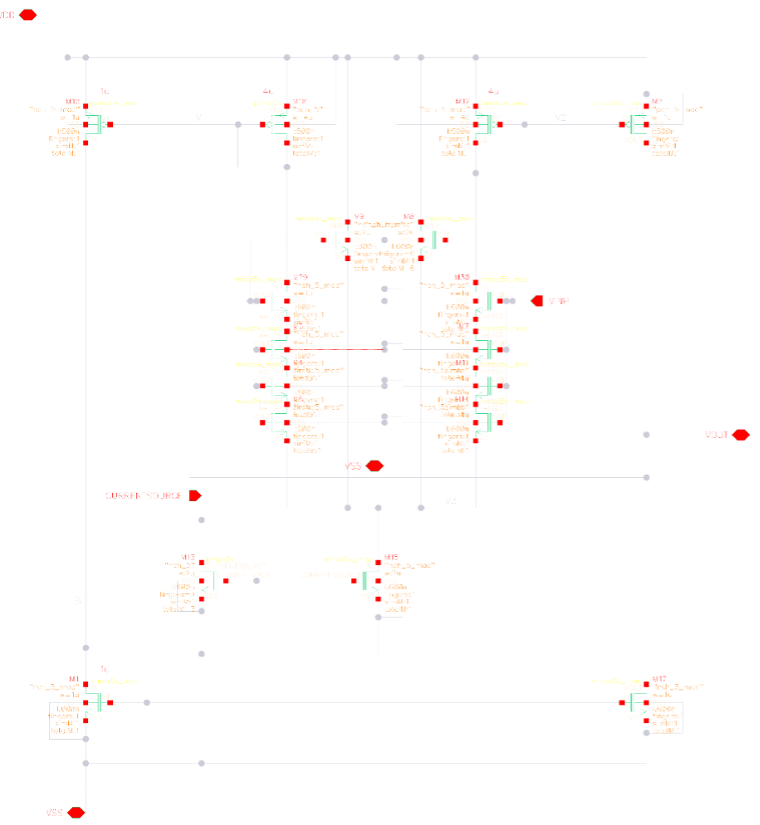
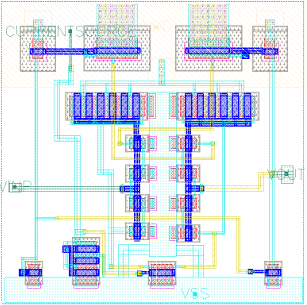
industry sponsored capstone. i still think about this project. em and circuit desgin colliding into the final boss of layout is such a fun challenge. this is a transcondutance filter for blocking noise from the mechanical "bounce" of the switch (from our pov the switch just closes but it actually turns on an off a few times before settling).

Transcondutance filter circuit Transcondutance filter layout

automated pcb layout

found diode's repo and wanted to try building in layout. they definitely have this its just not open sourced. so far im thinking:

  1. calculate speed of each trace (frequency * current/rise time)
  2. place these first as close as possible
  3. place I/O devices as far as possible from these traces
  4. create separate ground for these I/Os
  5. add ground plane and route rest of traces based on speed

super high level. so much more nuance to this but i like the idea of starting by trace speed. would also love the input of this system to be the standards you're trying to comply to (can get trace width, clearance, and creepage from that). this is what i have so far.

telemetry data analysis

good agentic use case because the telemetry data from mavlink is too big to fit into the context window. built an intent classifier to determine what context to feed it. i chunk the flight data into segments (takeoff, landing, etc) and had json for direct questions (max acceleration, max temp). this also made me realize how important prompt eval work is. and that json eats up a ton of tokens. repo

prospect recommendation system

this was contract work so can't share any code. but classical ml problem which gave me a great fundamental understanding of neural networks. problem was to recommend prospects to wealth managers with tabular prospect data (age income bracket, net worth, etc). goal was to get to collaborative filtering so put out a simple if else to a/b test on. started to vectorize the data and built a scoring system for user interactions (how valuable is a profile visit vs email sent) to test how well the weights of our vectors were working. used pca to reduce dimensionality on the refined vectors.

intro and nurture system

another contract project. system for automating outreach to nursing home owners with potential vendors. vendor would fill out a profile we'd use to find potential matches. sent out emails and used llms to analyze sentiment of responses. got to work with some exciting companies. we brought one from pre-seed to series a.

EMAR (electronic medication administration record)

the infra for this project was fun. had to learn about vpns which was a fun rabbit hole to go down.


a "network" is a bunch of computers connected through an "interface", which is how you'd physically connect each computer together if cloud wasn't a thing. watch this video it's really illuminating on this point.


an example of a "network" is a file storage transfer system, which jeff explains really well in the video. he does a lot of heavy file transfers so he built a dedicated "network" for it to not block himself from doing other things while transferring files.


but the cables arent the whole story, each computer needs an identifier so when you want to send data, you send it to the right computer. you'll write some software that, at some point, will tell the computer "now send this data to this computer". the code that runs this code (the "operating system"), figues out how to send him that data, and sends it


to be more exact, the data gets transferred through the interfaces i mentioned earlier. each interface has an address that tells other computers how to reach it (IP). the operating system keeps track of how to reach each computer via a "routing table".


in the case of a network connected purely via ethernet, the operating system will start by sending a "broadcast" message. "which one of you guys has this IP i need to reach?" the destination computer responds "i got you". data gets sent


this is called ARP (Address Resolution Protocol). the address that the OS uses to send data in this case is a MAC address, a unique ID that's actually defined by the computer hardware, not the guy building the network. and that my friends is what they call layer 2 networking.


now what happens when you want to reach the almighty internet. you have no direct connection. if you ARP for an IP outside this, you'll get nothing.


this is where "gateways" come in. the only difference here is that the gateway knows more routes than your computer. if you dont have the IP in your network, you send it to the gateway. and the gateway knows where to send it next. nothing changes here. still finding an IP (in this case the gateway IP) and still resolving its MAC address to send the data.


difference here is that there are millions of gateways that make up all the IPs you can possibly reach. at each "hop" the gateway ARPs for the destination IP, and if it doesnt have a direct route to it, will send to the next gateway. and on and on until you finally reach the destination IP.


that is literally the internet. there are "root servers" that know a shit ton of IPs and how to reach them. watch this ben eater video to learn more. here are all the root servers.


one more important piece of context. a computer can have multiple interfaces. some connect to the "gateway" meaning its accessible to the internet. some are connected only to other local computers. there's even a network that connects the computer to itself. if you've ever "started a server" on your computer and saw "localhost" that's your computer using its internal network


and every single "application" or "server" running on your computer can be connected to different networks depending on your setup.


fuck i need to explain processes now. a process is an operating system paradigm that allows multiple apps to run on the same machine. it's the OS's way of isolating apps. each process get's dedicated compute, memory, and for our context, a set of interfaces that connect to it.


a process connects to different networks through ports. its another OS paradigm. its not a physical thing. its a way for you to tell the OS "connect my app to these interfaces".


if you run sudo ss -ltnp , you'll see every all your apps and the ports they're listening on


alright i think were ready. so we know how computers talk. now we know how different applications running on the same computer can talk.


how does this emar thing work. well we need to receive data from the pharmacy. they use a lower level of communication than most apps (fine by me, i got to learn all this). instead of using the "HTTP" abstraction, which requires software to do all the plumbing we just went over, you have to set this up yourself.


you run a process on your computer that "listens" for TCP packets on a port. you tell the pharmacy "the computer running my code is reachable at this IP and its listening on this port". every software language gives you ways to wire in to the port to grab that data. i used typescript because there was a solid library for parsing the pharmacy data and it's event driven system is pretty useful here.


an "event" is a TCP message coming in and you can do things when an event fires. in this case, we parse the data with that library, do some business logic on it (what messages are relevant for our system? have we received this message before? what happens when processing fails?) then we make an API request that has more context for more business logic (which patient is this message for? does this patient already have this prescription?) and store the data in our db.


problem here is security. the messages we receive contains private data that can't be accessible on the internet (medicaid IDs, SSNs). how do we send this data over a non-ethernet connection while keeping it off "the internet"?


answer: you don't. you route the same way you always do. only you encrypt the entire packet and only you have the key for decrypting. this is a VPN.


specifically, a site-to-site VPN. site-site encrypts the entire packet, not just the payload. the payload is just the message itself. the packet contains the message plus destination and source IP and other metadata (when it was sent, how much data is int it). the VPN software "encapsulates" the packet, meaning it changes the source and destination IPs, which adds an extra layer of security.


alright how does this work now. you need a few things. first, an internal IP that does not change. if you have no stable IP, you have no stable reference the sender can route the data to. site-site no longer works. this is true in the case of many serverless environments like vercel serverless. they give you a short lived (ephermeral) IP. so you cant do site-site deployed on vercel. you need the "internal" IP for the next step.


once you have your stable internal IP, you need a subnet. all the big cloud providers give you this. typically, they're logically separated by region. us-east, us-west, these are all subnets. when you put a VPN "in front" of this subnet, you're telling the gateway that knows how to reach your IP/subnet "if you receive any incoming packets that's meant to go to this subnet, route it through the VPN. he knows how to decrypt the packet".


now, as you can imagine, you may receive traffic to this subnet that is just regular internet traffic. no decryption needed. this is why the internal IP distinction matters. you use a public IP for regular traffic and an internal IP for VPN traffic. theoretically you could use a public IP, but you'd be making the router's life harder. you want him to always send internal IP packets to your process. if you own the router you could set up rules for this, but you can't do that in the cloud. providers own the routers. so better to be safe.


ok last 2 things are the encryption key (typically IKEv2) and your destination computer's subnet and internal IP. now your tunnel is set up. nice.


i wanna also explain how IPsec works cause with this context, it makes perfect sense. remember how we said whenever you're sending data, your OS does an ARP for the next hop? if the next hop is the VPN gateway (which it will be whenever your destination IP is the IP of your destination computer), IPsec wakes up and encrypts that packet. its all happening at the OS level.


if you wanna test this out, you can use strongswan. check this out


alright now we have everything we need. except one piece. we want to be able to deploy quickly and not be locked into any cloud provider. so we use docker to bundle up all our app that we can port around.


docker networking is sick. you can use its internal networks to isolate different "services" from the internet. so the pharmacy server has a "gateway" that's accessible via the internet. but we only want that to be reachable. the processing logic and async system (bullmq) should not be accessible. This is how you minimize the “attack surface” of your app. And now with all our knowledge, this is cake. All you need to do is not make these processes run on ports that are connected to the interface connected to the internet (gateway network). You make direct connections with docker. In your docker compose, do not expose ports and use networks to define how they talk.


and that is how you do that i guess. i hope you learned something valuable. theres so much more to this. like how do you secure your linux machine (firewalls, user groups) and how you put the linux and VPN logic into code so you can deploy separate entire systems (terraform), but ill leave that for another day.


mwahhhhh. love ya